techonc Flow.
A process described in plain language becomes a corporate workflow-diagram PDF — AI builds the content, a deterministic engine draws it.
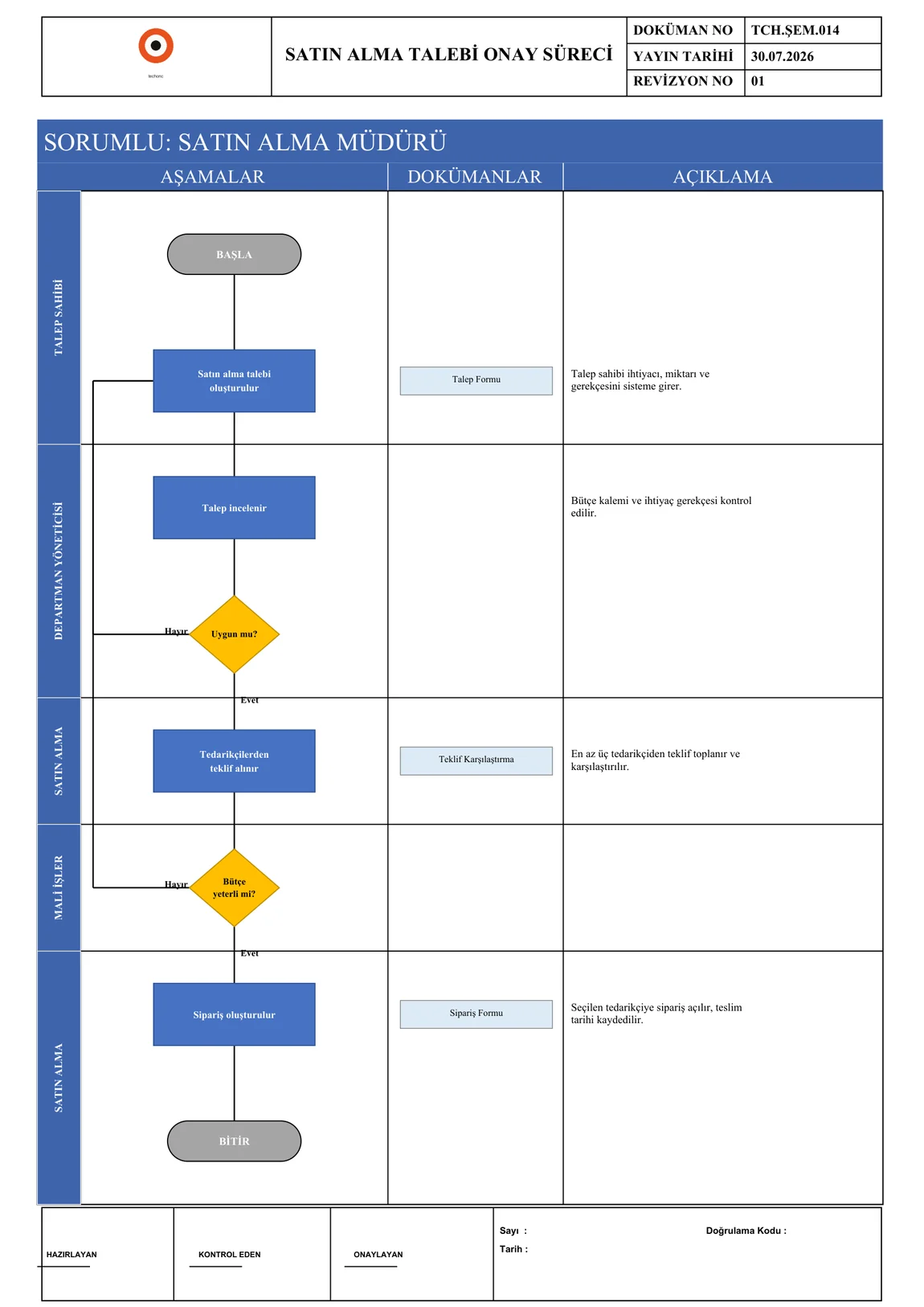
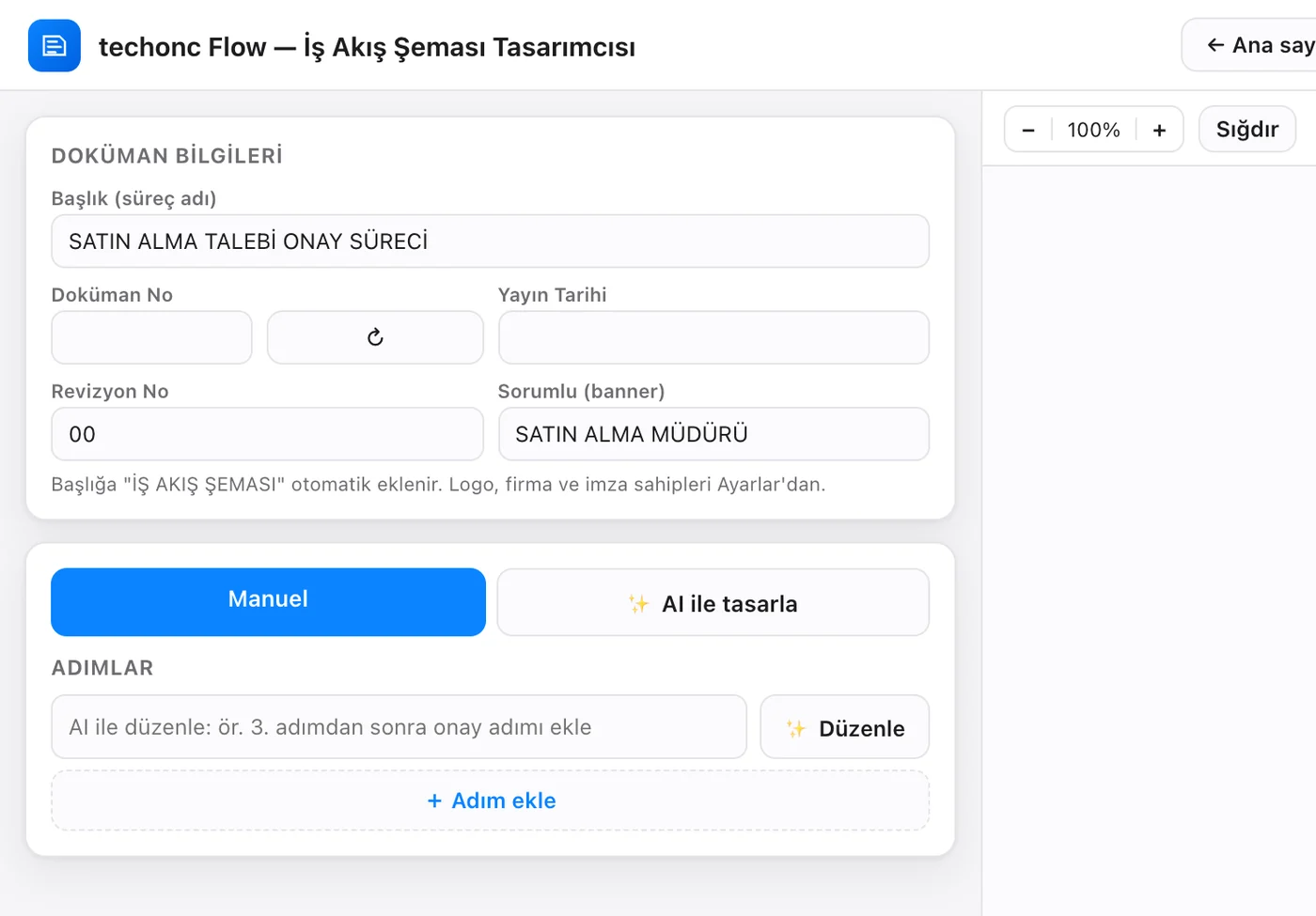
It is a desktop application, so there is no in-browser demo; the interface and a generated diagram are below.Problem
Official workflow diagrams were drawn by hand in office tools: alignment broke, formatting drifted, every revision took hours. Legacy diagrams were trapped inside scanned PDFs — uneditable.
Solution
The desktop app takes a process two ways: enter steps in a form, or describe it in plain language — the AI builds the steps and connections. Drawing is always done by a deterministic engine; the format can never break. Legacy PDFs are imported one by one or in bulk via vision.
Outcome
Multi-page, decision-branching PDFs in the corporate template within minutes; dozens of legacy diagrams in a folder become an editable digital archive with a single confirmation.
Modules
■ Home
Recent projects with previews, search, the next document number and stats.
■ Manual Step Editor
4 step types, swimlane-role assignment, YES/NO targets on decisions and loop-back links; drag-and-drop ordering.
■ Design with AI
Describe the process in plain language; the AI builds steps and connections, you fine-tune.
■ Edit with AI
Instructions like 'add an approval step after step 3' update the whole diagram.
■ Import from PDF
An existing diagram PDF is converted to an editable model via vision; original pages open as a side-panel reference.
■ Bulk Import
Every PDF in a folder (subfolders included) is parsed sequentially into separate projects.
■ Live Preview
Page-by-page preview generated from the real PDF on every change; zoom, fullscreen and PNG export.
■ Project Library
Projects saved locally with cached thumbnail cards.
■ Templates
Ready-made process templates load with one click; document number and date auto-assigned.
■ Frame Designer
Header/footer elements move by drag-and-drop; grid + snapping, a layer panel and its own undo/redo history.
■ Document Number Counter
Prefix-based auto-numbering; the counter advances only when a PDF is actually saved.
■ Settings
Logo, company name, document prefix, signatories and a personal API key in one place.
ARTIFICIAL INTELLIGENCE
Where AI comes in
Diagram generation from plain language
The plain-language description goes to the model under a strict JSON schema (Structured Outputs); swimlane rules and exactly two exits (YES/NO) per decision are enforced by the system instruction. The AI produces only steps and edges — it can't touch the drawing.
Editing by instruction
The current diagram is handed to the model whole, and an updated version is requested under the same strict schema; untouched steps must be preserved.
PDF import via vision
PDF pages are rasterised at high resolution and read by the model; header boxes, steps, YES/NO branches and loop-backs become an editable model. Turkish-specific casing fixes are applied automatically.
Screenshots
Key capabilities
The AI can't draw — by design
The AI only produces process content; the official format, layout and drawing are always guaranteed by the deterministic engine. 'The AI broke the format' cannot happen.
Bulk digitisation
Dozens of scanned diagrams in a folder become editable projects with one confirmation — built for migrating a company archive.
Reference panel
After import, the original document opens beside the editor so the extraction can be verified side by side.
True WYSIWYG preview
The preview is not a screen imitation; the actual PDF is generated and displayed — what you see is what prints.
Dual-platform + CI
One codebase ships a macOS DMG and a Windows installer EXE; every build smoke-tests itself without opening a window.
Offline operation
Manual mode works fully offline; AI features are optional and the app opens even if they can't load.
ADAPTATION
How it changes in another organisation
The format of the resulting diagram is adjusted to the quality standard the organisation follows and its own template. Process texts stay inside the organisation; because the app runs on the desktop, sensitive documents never leave it.
TECHNICAL DEEP DIVE
STACK
ENGINEERING NOTES
Safe parallel-branch layout
The layout engine only places 'safe' decision branches side by side; loop-backs run through a left channel, forward jumps through a right channel. Off-page links render as connector circles.
Automatic multi-page splitting
When a flow exceeds page capacity it splits evenly; frames and swimlane bands are rebuilt per page, and the page badge appears only on multi-page output.
Overflow-proof typography
Progressive font shrinking plus pixel-width-aware wrapping for titles, box texts and lane labels; no text can escape the template.
Data-driven frame definition
The header/footer is a JSON definition with placeholders; the same definition feeds both the PDF drawing and the on-screen drag-and-drop designer.
Cross-platform Turkish font resolution
System font paths are scanned per platform and Turkish-capable typefaces are registered with the PDF engine; all three OSes produce identical output.